Guide · Marketplace rules

Jewelry White Background Requirements on Etsy, Amazon and Shopify

White backgrounds are a rule on one marketplace, a convention on another and a style choice on a third. This guide compares them for jewelry sellers and explains how to get a truly white image.

Published · Updated · Image25 Jewelry Studio

Make a white background image

In short

Jewelry white background requirements differ by platform. Amazon is widely reported to require pure white (RGB 255) main images; Etsy does not require white but requires accurate photos and, for most listings, one unedited photo; Shopify leaves it to your theme.

Amazon
Pure white main image, product about 85% of frame
Etsy
White optional; accuracy and one unedited photo
Shopify
No platform rule; consistency matters
Pure white
RGB 255, 255, 255, edge to edge

01

Jewelry White Background Requirements at a Glance

A white background does two things for jewelry: it removes distraction so the piece reads at thumbnail size, and it makes every listing in a grid look like part of the same catalog. That is why marketplaces built around search results care about it most.

The strictness varies. Amazon’s main image is the strictest case: as widely reported, the background must be pure white and the product must fill most of the frame. Etsy has no white-background rule, but since its October 2026 update it requires most listings to include one real, unedited photo, which is often taken on a real surface rather than white. Shopify stores set their own style.

“White” also means different things. To a person, cream and light gray can look white. To an automated check, only RGB 255, 255, 255 is pure white. If a platform requires white, measure it rather than eyeballing it.
Strictest
Amazon main image
Most flexible
Your own Shopify store
Etsy twist
One real, unedited photo for most listings
Verify on
Each platform’s official policy page

02

Amazon, Etsy and Shopify White Background Rules Compared

As reported in public guidance; confirm on each platform before you rely on it.

White background rules by platform
PlatformWhite required?Applies toOther key rule
AmazonYes, pure white (RGB 255)Main imageProduct fills about 85%; no text, props or extras
EtsyNoAny photoMost listings need one real, unedited photo
ShopifyNo platform ruleYour theme decidesConsistent backdrops across collections

03

What Pure White Looks Like

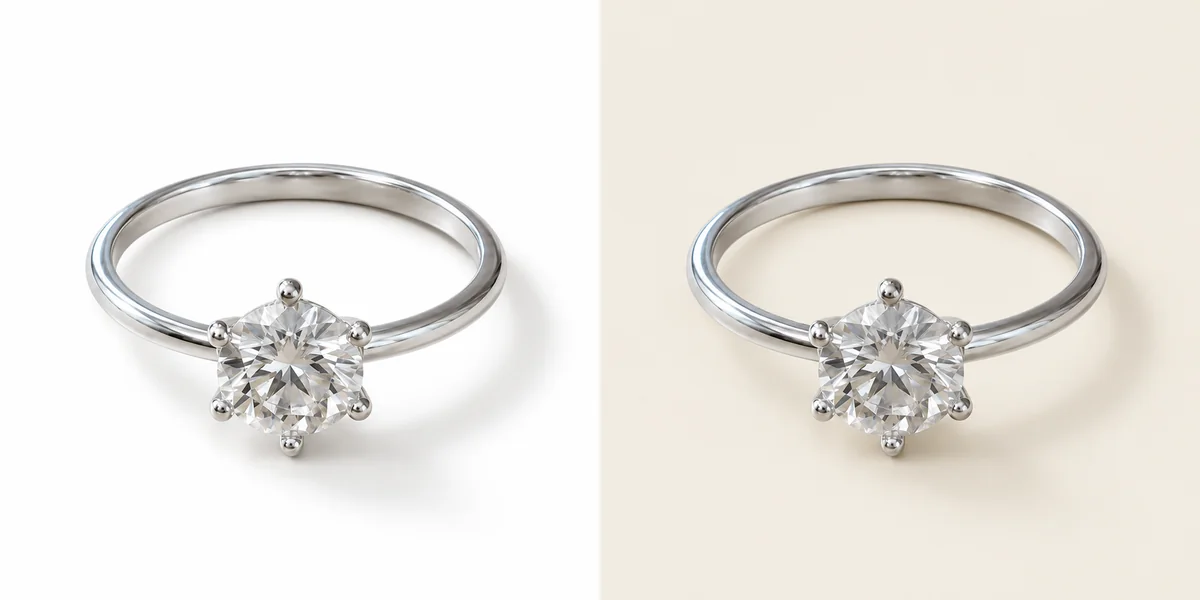
The difference between pure white and off-white is easy to miss by eye.

The same silver ring on a pure white background and on a slightly off-white background, side by side
Pure white on the left, off-white on the right. Only the left passes a strict pure-white check.
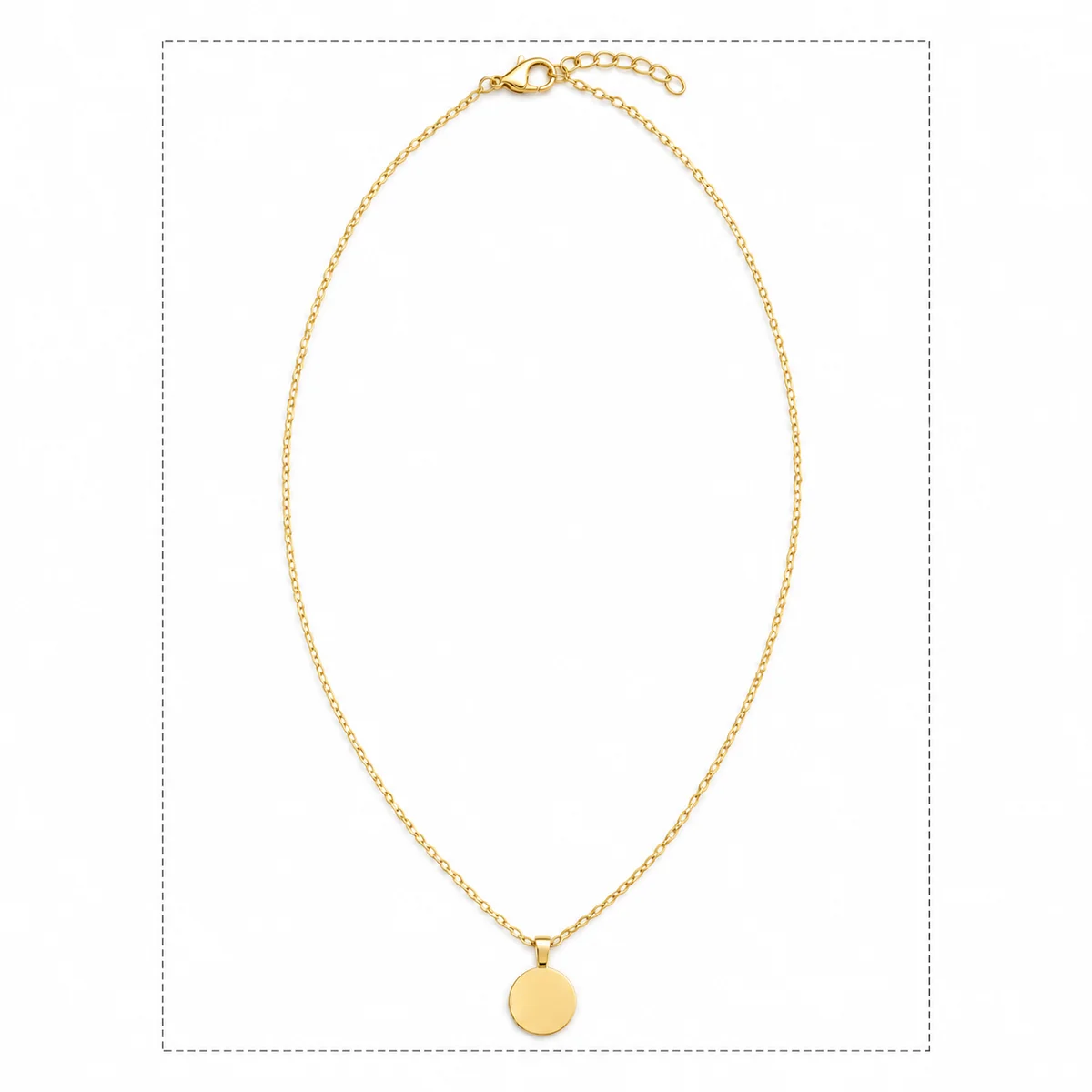
A gold pendant necklace filling most of a square white frame with a dashed guide showing the fill area
A main image where the piece fills most of the frame, the look marketplaces with fill rules expect.

04

Amazon White Background, Etsy White Background and Shopify White Background in Detail

What each platform means in practice for jewelry.

Amazon white background

The main image is reported to need a pure white background, the product filling about 85% of the frame, and nothing else in the shot: no props, packaging, text or badges. Secondary images can use other backgrounds. Small jewelry often fails on fill, so crop tighter than feels natural.

Etsy white background

Etsy does not require white. Since its October 2026 update, most listings need at least one real, unedited photo of the item on a real background, and every image must represent the item accurately. Many jewelry sellers use a real-surface photo first and a white image as a supporting view.

Shopify white background

Shopify has no white-background rule; your theme and brand decide. White or light gray suits most jewelry themes because it lines up in collection grids. Pick one backdrop per collection and keep it.

Other marketplaces

Many other marketplaces and comparison sites also favor white main images. When a platform does not specify, a clean white or light gray image is a safe default for the first photo.

Shadows on white

A soft contact shadow directly under the piece is the most natural choice for secondary images; keep main images on strict platforms close to shadowless.

05

How to Get a Clean White Background for Jewelry

Two routes: shoot it white, or make it white afterwards.

  1. 1

    Shoot on white in soft light

    Use a white card or light tent, light it evenly so the white does not turn gray, and keep the piece slightly away from the background to avoid hard shadows.

  2. 2

    Or replace the background

    Upload a sharp photo to a white background tool and choose a shadow style: a soft contact shadow, a faint reflection or none. For strict main images, choose no shadow or the faintest contact shadow.

  3. 3

    Measure the white and check the piece

    Use any image editor’s color picker on the corners; pure white reads 255, 255, 255. Then compare stones, prongs, chain and metal with the real piece.

06

White Background Checklist for Jewelry

Do

  • Check corners for RGB 255, 255, 255 when white is required
  • Fill most of the frame on marketplace main images
  • Keep shadows soft and directly under the piece
  • Keep one real, unedited photo on Etsy listings
  • Use the same white across a collection

Avoid

  • Cream or light gray when pure white is required
  • White metal disappearing into the background
  • Props or packaging on a strict main image
  • Text, badges or watermarks on main images
  • Edits that change the piece while whitening

Before you publish

Platform Rules Change

This guide summarizes public guidance and seller-tool summaries, not official statements from Amazon, Etsy or Shopify. Rules vary by category and change over time; the platforms’ own policy pages are the final word. These platforms are trademarks of their owners; Image 25 is not affiliated with them.

References

Sources

Checked on . Platform rules change; confirm the current policy before you rely on it.

  1. Amazon Seller Central: Product image requirements (official)

    Primary source for Amazon main and secondary image rules. Sign-in may be required.

  2. Etsy: Listing Image Requirements (official policy)

    Primary source for the unedited photo rule and accuracy requirement.

  3. Shopify Help Center: Product media (official)

    Official guidance on product images and recommended sizes.

  4. Jungle Scout: Amazon image requirements

    Seller-tool summary of Amazon main image rules, including jewelry.

Questions

Jewelry White Background Requirements FAQ

What are the jewelry white background requirements on Amazon?

As widely reported, the main image needs a pure white background (RGB 255, 255, 255) with the product filling about 85% of the frame and no text, props or extra items. Secondary images are more flexible. Confirm your category rules in Seller Central.

Does Etsy require a white background for jewelry?

No. Etsy requires accurate photos and, since October 2026, at least one real, unedited photo of the item for most listings. White backgrounds are optional and work well as supporting images.

Does Shopify require a white background?

No. Your theme and brand decide. White or light gray is popular for jewelry because it keeps collection grids tidy, but consistency matters more than the exact color.

How do I know if my background is pure white?

Open the image in any editor and use the color picker on the corners and edges. Pure white reads 255, 255, 255. Values like 250, 250, 248 look white but can fail a strict check.

Can I put a shadow under jewelry on a white background?

A soft contact shadow directly under the piece is common and usually acceptable on secondary images. For strict main images, keep it faint or use no shadow, and never let it look like a separate object.

Is a white background always the best choice for jewelry?

No. White is best for search grids and strict marketplaces. Real surfaces, velvet and lifestyle settings often sell better as supporting images because they add scale and mood.

Can I use AI to make a white background for jewelry?

Yes, as long as the result still represents the real piece. Compare stones, prongs, chain and metal tone with the original, and check the background is pure white if the platform requires it.

Meet Jewelry White Background Requirements in One Step

Upload a sharp product photo, choose a shadow style and check the white before you list.

Open the white background tool